ROS1的.bag与ROS2的.db3格式转化,以及.db3获取源数据
·
ROS1 .bag 与 ROS2 .db3 格式转换及数据提取指南
📋 目录
📖 概述
本文档详细介绍如何在没有完整ROS环境的情况下:
- 分析 ROS1
.bag和 ROS2.db3文件内容 - 两种格式之间的相互转换
- 从两种格式中提取图像和点云等源数据
🛠️ 环境准备
必需软件包安装
# 在 conda 环境中安装必要包
conda activate your_env
pip install rosbags opencv-python numpy sqlite3
环境验证
python -c "import rosbags, cv2, numpy, sqlite3; print('所有依赖包已就绪')"
📊 格式分析
ROS1 .bag vs ROS2 .db3 对比
| 特性 | ROS1 (.bag) | ROS2 (.db3) |
|---|---|---|
| 文件格式 | 自定义二进制格式 | SQLite 数据库格式 |
| 文件结构 | 单个 .bag 文件 | 多个文件:.db3 + metadata.yaml |
| 可读性 | 需要特殊工具 | 可用 SQLite 工具直接查看 |
| 索引性能 | 较慢 | 快速(数据库索引) |
| 存储方式 | 线性存储 | 数据库表存储 |
文件结构分析
分析 .bag 文件内容
# inspect_bag.py
from rosbags.rosbag1 import Reader as Reader1
from rosbags.rosbag2 import Reader as Reader2
import os

def analyze_bag_file(file_path):
    """分析 bag 文件内容"""
    if file_path.endswith('.bag'):
        Reader = Reader1
    else:
        Reader = Reader2

    with Reader(file_path) as reader:
        print("=== 话题信息 ===")
        for connection in reader.connections:
            print(f"话题: {connection.topic} | 类型: {connection.msgtype} | 数量: {connection.msgcount}")

        print("\n=== 文件概览 ===")
        total_msg_count = sum(conn.msgcount for conn in reader.connections)
        print(f"总消息数: {total_msg_count}")
        duration_ns = reader.duration
        print(f"时长: {duration_ns / 1e9:.2f} 秒")

# 使用示例
analyze_bag_file("converted_ros1_bag.bag")
分析 .db3 文件内容
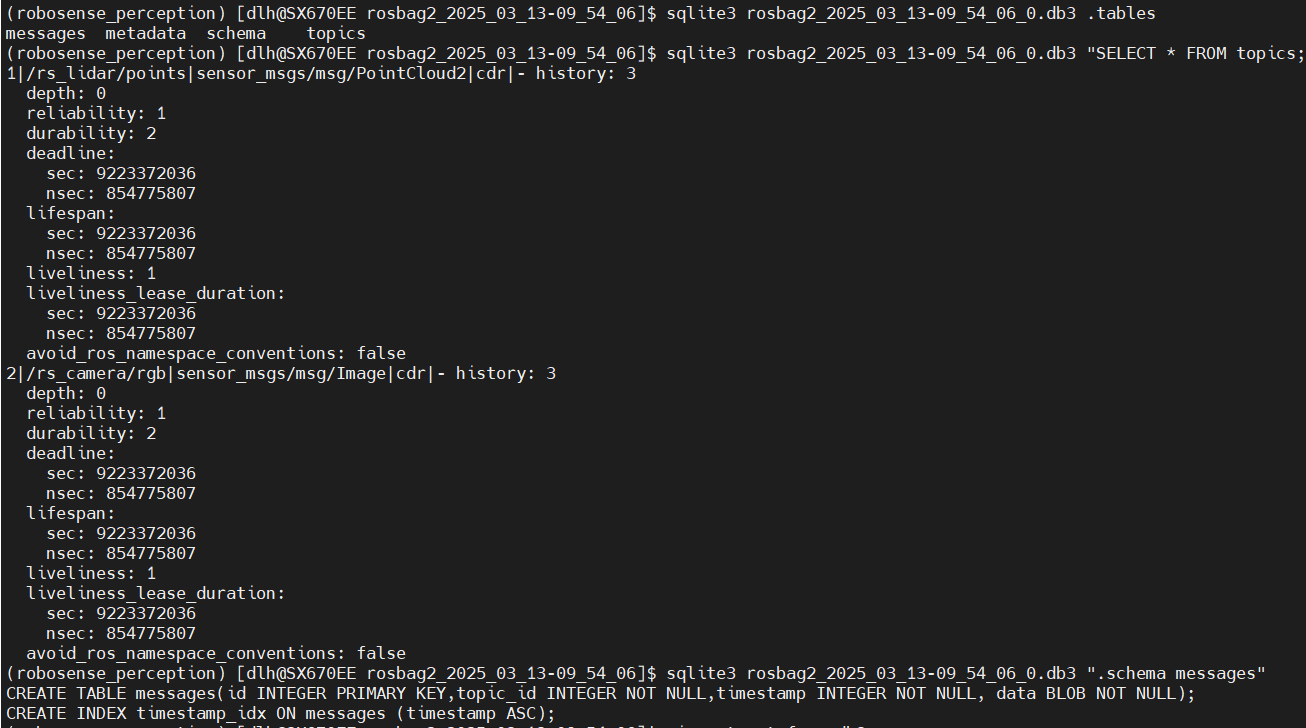
# 使用 SQLite 直接分析 .db3 文件
sqlite3 rosbag2_2025_03_13-09_54_06_0.db3 ".tables"
sqlite3 rosbag2_2025_03_13-09_54_06_0.db3 "SELECT * FROM topics;"
sqlite3 rosbag2_2025_03_13-09_54_06_0.db3 "SELECT topic_id, COUNT(*) FROM messages GROUP BY topic_id;"
🔄 格式转换
.db3 转 .bag
# 将 ROS2 .db3 转换为 ROS1 .bag
# 注意:需要提供目录路径,而不是单个文件
rosbags-convert --src /path/to/rosbag_directory --dst output.bag

# 实际示例(在当前目录)
rosbags-convert --src . --dst converted_ros1_bag.bag
.bag 转 .db3
# 将 ROS1 .bag 转换为 ROS2 .db3
rosbags-convert --src input.bag --dst /path/to/output_directory
# 例如,使用Python模块直接运行
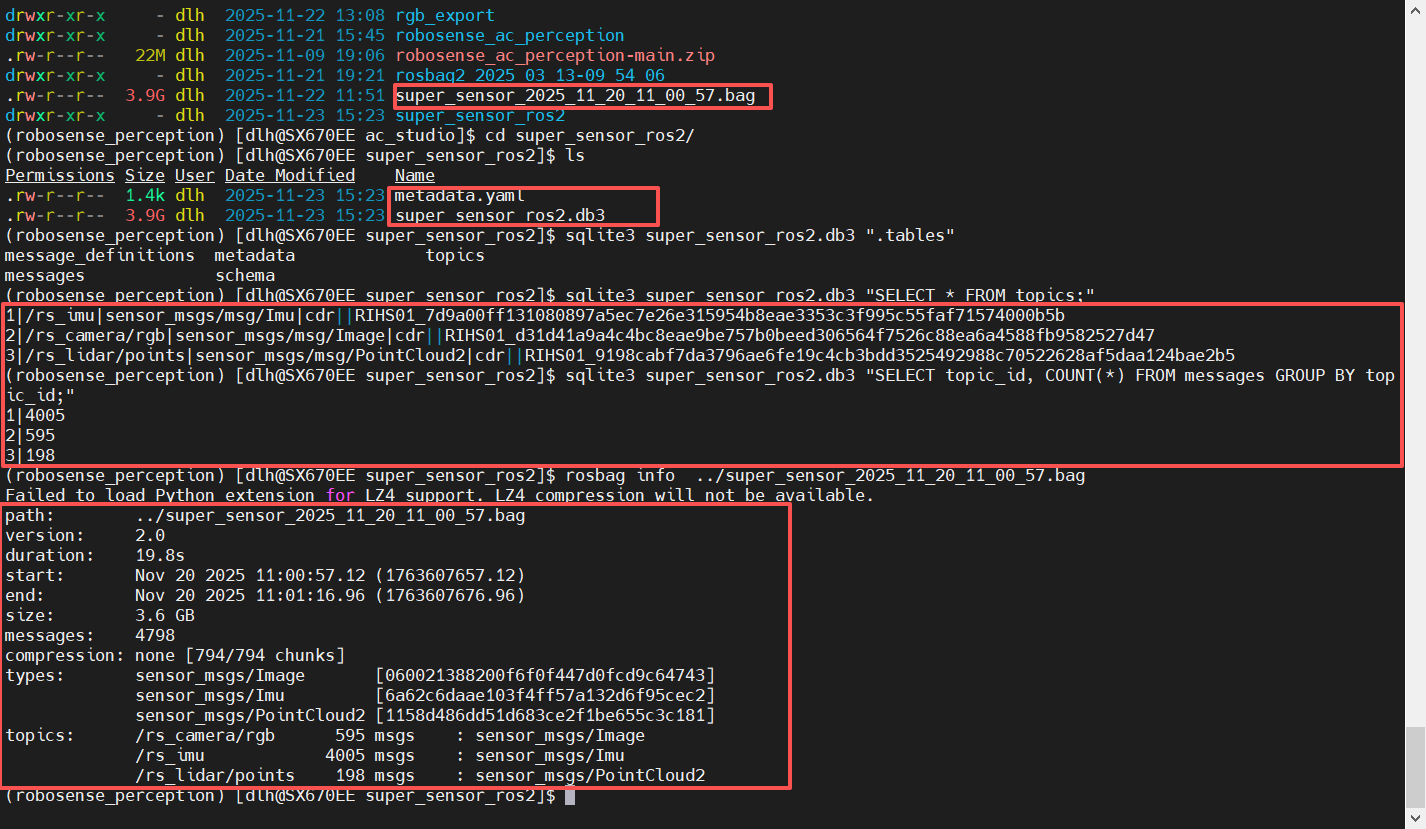
python -m rosbags.convert super_sensor_2025_11_20_11_00_57.bag --dst super_sensor_ros2
转换前后包含信息不变:
转换脚本
# convert_formats.py
import subprocess
import os

def convert_db3_to_bag(db3_directory, output_bag):
    """将 .db3 目录转换为 .bag 文件"""
    cmd = ['rosbags-convert', '--src', db3_directory, '--dst', output_bag]
    try:
        subprocess.run(cmd, check=True)
        print(f"转换成功: {db3_directory} -> {output_bag}")
    except subprocess.CalledProcessError as e:
        print(f"转换失败: {e}")

def convert_bag_to_db3(bag_file, output_directory):
    """将 .bag 文件转换为 .db3 目录"""
    cmd = ['rosbags-convert', '--src', bag_file, '--dst', output_directory]
    try:
        subprocess.run(cmd, check=True)
        print(f"转换成功: {bag_file} -> {output_directory}")
    except subprocess.CalledProcessError as e:
        print(f"转换失败: {e}")

# 使用示例
# convert_db3_to_bag('.', 'converted.bag')
# convert_bag_to_db3('input.bag', 'output_ros2_bag')
📸 数据提取
从 .bag 文件提取数据
提取图像数据
# extract_images_from_bag.py
from rosbags.rosbag1 import Reader
import cv2
import numpy as np
import os

def extract_images_from_bag(bag_file, output_dir, max_images=None):
    """从 .bag 文件提取图像数据"""
    os.makedirs(output_dir, exist_ok=True)
    count = 0

    with Reader(bag_file) as reader:
        print(f"开始从 {bag_file} 提取图像...")

        for connection, timestamp, rawdata in reader.messages():
            if connection.topic == '/rs_camera/rgb':
                try:
                    # 分析数据长度确定图像尺寸
                    if len(rawdata) == 6220851:  # 1920x1080 RGB
                        image_data = rawdata[-6220800:]  # 提取图像数据部分
                        img_array = np.frombuffer(image_data, dtype=np.uint8).reshape(1080, 1920, 3)
                        cv2.imwrite(f'{output_dir}/image_{count:06d}.png', img_array)
                        count += 1

                        if count % 50 == 0:
                            print(f'已提取 {count} 张图像')

                    # 限制提取数量(可选)
                    if max_images and count >= max_images:
                        break

                except Exception as e:
                    print(f'处理图像 {count} 时出错: {e}')
                    continue

    print(f'提取完成! 共 {count} 张图像保存到 {output_dir}')

# 使用示例
extract_images_from_bag('converted_ros1_bag.bag', 'extracted_images_bag')
提取点云数据
# extract_pointclouds_from_bag.py
from rosbags.rosbag1 import Reader
import os

def extract_pointclouds_from_bag(bag_file, output_dir, max_pointclouds=None):
    """从 .bag 文件提取点云数据"""
    os.makedirs(output_dir, exist_ok=True)
    count = 0

    with Reader(bag_file) as reader:
        print(f"开始从 {bag_file} 提取点云...")

        for connection, timestamp, rawdata in reader.messages():
            if connection.topic == '/rs_lidar/points':
                try:
                    # 保存原始点云数据
                    with open(f'{output_dir}/pointcloud_{count:06d}.bin', 'wb') as f:
                        f.write(rawdata)

                    # 保存元数据
                    with open(f'{output_dir}/pointcloud_{count:06d}_info.txt', 'w') as f:
                        f.write(f'timestamp: {timestamp}\n')
                        f.write(f'data_length: {len(rawdata)} bytes\n')

                    count += 1

                    if count % 20 == 0:
                        print(f'已提取 {count} 帧点云')

                    # 限制提取数量(可选)
                    if max_pointclouds and count >= max_pointclouds:
                        break

                except Exception as e:
                    print(f'处理点云 {count} 时出错: {e}')
                    continue

    print(f'点云提取完成! 共 {count} 帧保存到 {output_dir}')

# 使用示例
extract_pointclouds_from_bag('converted_ros1_bag.bag', 'extracted_pointclouds_bag')
从 .db3 文件提取数据
直接 SQLite 提取图像
# extract_images_from_db3.py
import sqlite3
import cv2
import numpy as np
import os

def extract_images_from_db3(db3_file, output_dir):
    """直接从 .db3 数据库提取图像数据"""
    os.makedirs(output_dir, exist_ok=True)

    # 连接到数据库
    conn = sqlite3.connect(db3_file)
    cursor = conn.cursor()

    # 查询图像消息
    cursor.execute('''
        SELECT m.data
        FROM messages m
        JOIN topics t ON m.topic_id = t.id
        WHERE t.name = '/rs_camera/rgb'
        ORDER BY m.timestamp
    ''')

    count = 0
    print(f"开始从 {db3_file} 提取图像...")

    for row in cursor:
        rawdata = row[0]

        # 提取 1920x1080 图像数据
        expected_size = 1920 * 1080 * 3  # 6,220,800 字节

        if len(rawdata) >= expected_size:
            try:
                image_data = rawdata[-expected_size:]
                img_array = np.frombuffer(image_data, dtype=np.uint8).reshape(1080, 1920, 3)
                cv2.imwrite(f'{output_dir}/image_{count:06d}.png', img_array)
                count += 1

                if count % 50 == 0:
                    print(f'已提取 {count} 张图像')

            except Exception as e:
                continue

    conn.close()
    print(f'数据库提取完成! 共 {count} 张图像保存到 {output_dir}')

# 使用示例
extract_images_from_db3('rosbag2_2025_03_13-09_54_06_0.db3', 'extracted_images_db3')
使用 rosbags 库提取 .db3 数据
# extract_from_db3_with_rosbags.py
from rosbags.rosbag2 import Reader
from rosbags.typesys import get_typestore, Stores
import cv2
import numpy as np
import os

def extract_from_db3_with_rosbags(db3_directory, output_dir):
    """使用 rosbags 库从 .db3 目录提取数据"""
    os.makedirs(output_dir, exist_ok=True)
    typestore = get_typestore(Stores.ROS2_HUMBLE)
    count = 0

    # 注意:需要提供目录路径
    with Reader(db3_directory) as reader:
        print(f"开始从目录 {db3_directory} 提取图像...")

        for connection, timestamp, rawdata in reader.messages():
            if connection.topic == '/rs_camera/rgb':
                try:
                    msg = typestore.deserialize_cdr(rawdata, connection.msgtype)

                    if hasattr(msg, 'data') and hasattr(msg, 'width') and hasattr(msg, 'height'):
                        img_array = np.frombuffer(msg.data, dtype=np.uint8).reshape(msg.height, msg.width, 3)
                        cv2.imwrite(f'{output_dir}/image_{count:06d}.png', img_array)
                        count += 1

                        if count % 50 == 0:
                            print(f'已提取 {count} 张图像')

                except Exception as e:
                    print(f'处理图像时出错: {e}')
                    continue

    print(f'提取完成! 共 {count} 张图像保存到 {output_dir}')

# 使用示例(注意:需要包含 .db3 文件的目录)
# extract_from_db3_with_rosbags('.', 'extracted_images_rosbags')
提取点云数据
# 提取点云数据
python -c "
import sqlite3
import os

os.makedirs('extracted_db3_pointclouds', exist_ok=True)

conn = sqlite3.connect('rosbag2_2025_03_13-09_54_06_0.db3')
cursor = conn.cursor()

# 获取点云消息
cursor.execute('''
    SELECT m.data, m.timestamp
    FROM messages m
    JOIN topics t ON m.topic_id = t.id
    WHERE t.name = '/rs_lidar/points'
    ORDER BY m.timestamp
''')

count = 0
print('开始提取点云数据...')

for row in cursor:
    rawdata, timestamp = row

    try:
        # 保存原始点云数据
        with open(f'extracted_db3_pointclouds/pointcloud_{count:06d}.bin', 'wb') as f:
            f.write(rawdata)

        # 保存时间戳信息
        with open(f'extracted_db3_pointclouds/pointcloud_{count:06d}_info.txt', 'w') as f:
            f.write(f'timestamp: {timestamp}\\n')
            f.write(f'data_length: {len(rawdata)} bytes\\n')

        count += 1

        if count % 20 == 0:
            print(f'已提取 {count} 帧点云')

    except Exception as e:
        continue

conn.close()
print(f'点云提取完成! 共 {count} 帧')
"
🎯 批量处理脚本
一键提取所有数据
# extract_all_data.py
import os
import sqlite3
import cv2
import numpy as np
from rosbags.rosbag1 import Reader as BagReader

def extract_all_data(bag_file=None, db3_file=None, output_base_dir="extracted_data"):
    """一键提取所有数据,支持 .bag 和 .db3 文件"""

    if bag_file:
        extract_from_bag(bag_file, output_base_dir)

    if db3_file:
        extract_from_db3(db3_file, output_base_dir)

def extract_from_bag(bag_file, output_base_dir):
    """从 .bag 文件提取所有数据"""
    image_dir = os.path.join(output_base_dir, "bag_images")
    pcd_dir = os.path.join(output_base_dir, "bag_pointclouds")

    os.makedirs(image_dir, exist_ok=True)
    os.makedirs(pcd_dir, exist_ok=True)

    image_count = 0
    pcd_count = 0

    with BagReader(bag_file) as reader:
        print(f"处理 .bag 文件: {bag_file}")

        for connection, timestamp, rawdata in reader.messages():
            try:
                if connection.topic == '/rs_camera/rgb':
                    # 提取图像
                    if len(rawdata) == 6220851:
                        image_data = rawdata[-6220800:]
                        img_array = np.frombuffer(image_data, dtype=np.uint8).reshape(1080, 1920, 3)
                        cv2.imwrite(f'{image_dir}/image_{image_count:06d}.png', img_array)
                        image_count += 1

                elif connection.topic == '/rs_lidar/points':
                    # 提取点云
                    with open(f'{pcd_dir}/pointcloud_{pcd_count:06d}.bin', 'wb') as f:
                        f.write(rawdata)
                    pcd_count += 1

                # 进度显示
                if (image_count + pcd_count) % 100 == 0:
                    print(f"进度: {image_count} 图像, {pcd_count} 点云")

            except Exception as e:
                continue

    print(f".bag 提取完成: {image_count} 图像, {pcd_count} 点云")

def extract_from_db3(db3_file, output_base_dir):
    """从 .db3 文件提取所有数据"""
    image_dir = os.path.join(output_base_dir, "db3_images")
    pcd_dir = os.path.join(output_base_dir, "db3_pointclouds")

    os.makedirs(image_dir, exist_ok=True)
    os.makedirs(pcd_dir, exist_ok=True)

    conn = sqlite3.connect(db3_file)
    cursor = conn.cursor()

    # 提取图像
    cursor.execute("SELECT data FROM messages WHERE topic_id = (SELECT id FROM topics WHERE name = '/rs_camera/rgb')")
    image_count = 0
    for row in cursor:
        rawdata = row[0]
        if len(rawdata) >= 6220800:
            try:
                image_data = rawdata[-6220800:]
                img_array = np.frombuffer(image_data, dtype=np.uint8).reshape(1080, 1920, 3)
                cv2.imwrite(f'{image_dir}/image_{image_count:06d}.png', img_array)
                image_count += 1
            except:
                continue

    # 提取点云
    cursor.execute("SELECT data FROM messages WHERE topic_id = (SELECT id FROM topics WHERE name = '/rs_lidar/points')")
    pcd_count = 0
    for row in cursor:
        rawdata = row[0]
        with open(f'{pcd_dir}/pointcloud_{pcd_count:06d}.bin', 'wb') as f:
            f.write(rawdata)
        pcd_count += 1

    conn.close()
    print(f".db3 提取完成: {image_count} 图像, {pcd_count} 点云")

# 使用示例
# extract_all_data(bag_file='converted_ros1_bag.bag', db3_file='rosbag2_2025_03_13-09_54_06_0.db3')
🔧 故障排除
常见问题及解决方案
1. 编码错误
# 问题:'utf-8' codec can't decode byte...
# 解决方案:使用正确的 typestore
from rosbags.typesys import get_typestore, Stores
typestore = get_typestore(Stores.ROS1_NOETIC)  # 对于 ROS1 bag
# 或
typestore = get_typestore(Stores.ROS2_HUMBLE)  # 对于 ROS2 db3
2. 文件路径错误
# 问题:ReaderError: Could not read metadata...
# 解决方案:对于 .db3 文件,使用目录路径而不是文件路径
with Reader('.') as reader:  # 当前目录包含 .db3 和 metadata.yaml
    # 处理消息
3. 图像尺寸不匹配
# 解决方案:尝试常见图像尺寸
sizes_to_try = [
    (480, 640),     # 640x480
    (720, 1280),    # 1280x720
    (1080, 1920),   # 1920x1080
]

for height, width in sizes_to_try:
    expected_size = height * width * 3
    if len(rawdata) >= expected_size:
        # 尝试提取
4. 数据位置不确定
# 解决方案:尝试不同的偏移量
for offset in [0, 100, 200, 500, 1000]:
    image_data = rawdata[offset:offset+expected_size]
    # 尝试解析
调试命令
# 检查二进制数据结构
python -c "
from rosbags.rosbag1 import Reader
with Reader('converted_ros1_bag.bag') as reader:
    count = 0
    for connection, timestamp, rawdata in reader.messages():
        if connection.topic == '/rs_camera/rgb' and count < 2:
            print(f'消息 {count}: 长度={len(rawdata)} 字节')
            print(f'数据长度分析: {len(rawdata)}')
            count += 1
"

# 检查提取结果
ls -la extracted_*/ | head -5
find . -name "*.png" -type f -size +10k | head -3
file extracted_images/*.png 2>/dev/null | head -3
📁 输出文件结构
成功提取后的文件结构:
extracted_data/
├── bag_images/
│   ├── image_000000.png
│   ├── image_000001.png
│   └── ...
├── bag_pointclouds/
│   ├── pointcloud_000000.bin
│   ├── pointcloud_000000_info.txt
│   └── ...
├── db3_images/
│   ├── image_000000.png
│   ├── image_000001.png
│   └── ...
└── db3_pointclouds/
    ├── pointcloud_000000.bin
    ├── pointcloud_000000_info.txt
    └── ...

立足具身智能前沿赛道,致力于搭建全球化、开源化、全栈式技术交流与实践共创平台。
更多推荐
 19
19 0
0- 0


 已为社区贡献1条内容

所有评论(0)