3.灵心巧手的L21灵巧手pybullet仿真及图形页面控制(ROS1)
1.自己配置好文件参数
gui_control.launch文件和仿真的文件都需要改,修改成对应的灵巧手版本。
2.图形化页面启动
cd ~/Linker_Hand_SDK_ROSsource devel/setup.bashroslaunch gui_control gui_control.launch3.Pybullet页面启动
cd ~/Linker_Hand_Pybullet_ros
source ./devel/setup.bashrosrun linker_hand_pybullet_ros linker_hand_pybullet.py _hand_type:=L21控制示例代码(在控制话题发布控制指令,0到255可以不用自己做映射)
抓握
rostopic pub /cb_right_hand_control_cmd sensor_msgs/JointState "{header: {seq: 0, stamp: {secs: 0, nsecs: 0}, frame_id: ''}, name: [], position: [248, 127, 107, 180, 214, 42, 137, 0.0, 30, 20, 189, 0.0, 0.0, 0.0, 0.0, 59, 47, 32, 11, 17, 170, 43, 84, 76, 81], velocity: [], effort: []}" -r 10
展开
rostopic pub /cb_right_hand_control_cmd sensor_msgs/JointState "{header: {seq: 0, stamp: {secs: 0, nsecs: 0}, frame_id: ''}, name: [], position: [255, 255, 255, 255, 255, 255, 255, 255, 255, 255, 255, 255,255, 255,255,255,255,255,255,255,255, 255, 255,255, 255], velocity: [], effort: []}" -r 10
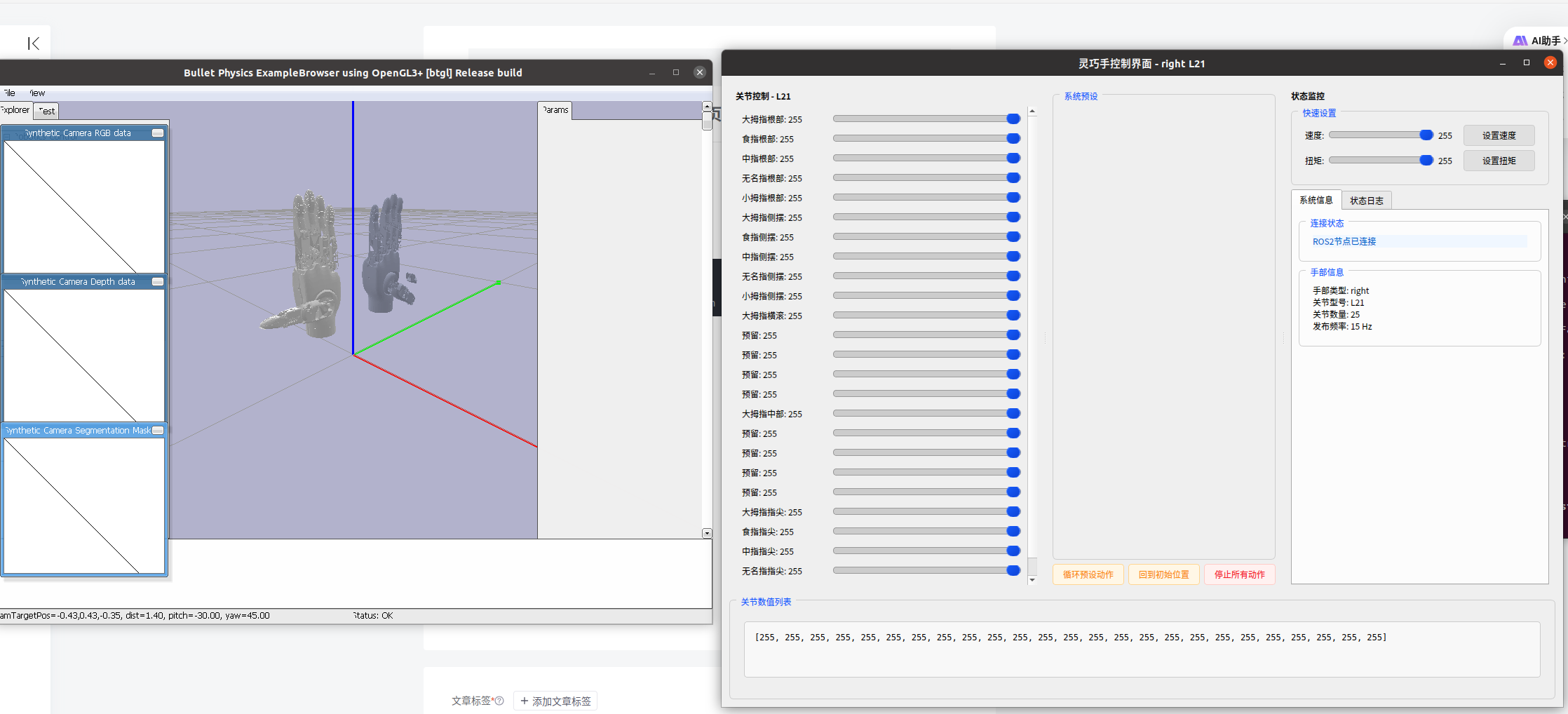
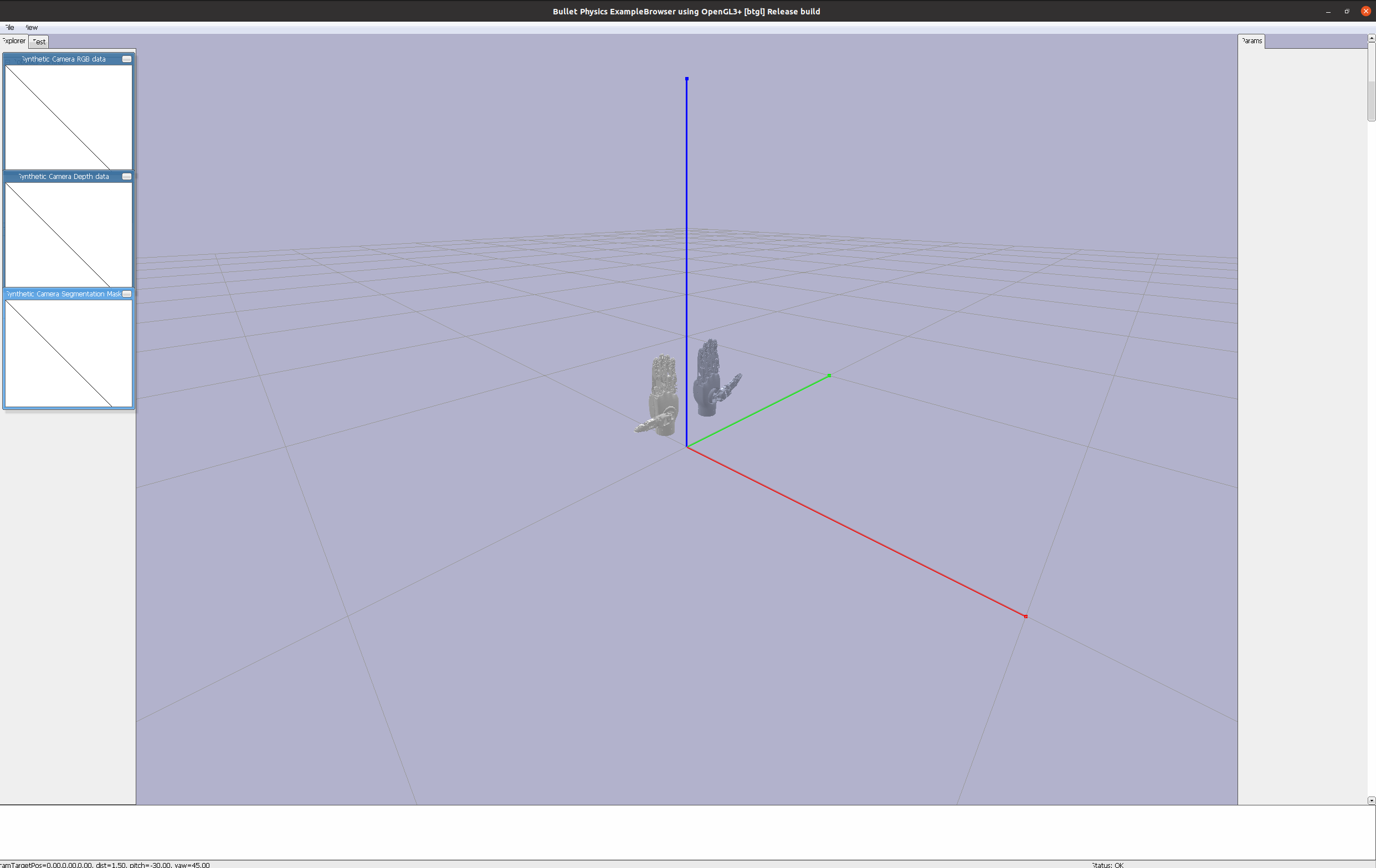
然后就可以使用了,但是他的L21灵巧手里面的仿真的URDF文件可能有些问题,要自己去官网直接找URDF进行替换,但是替换后的灵巧手会发生抖动。
可以在下面这个网站浏览URDF文件,点击Demo here进入
使用示例:https://blog.csdn.net/Bing_Lee/article/details/130947210
错误案例
正确案例
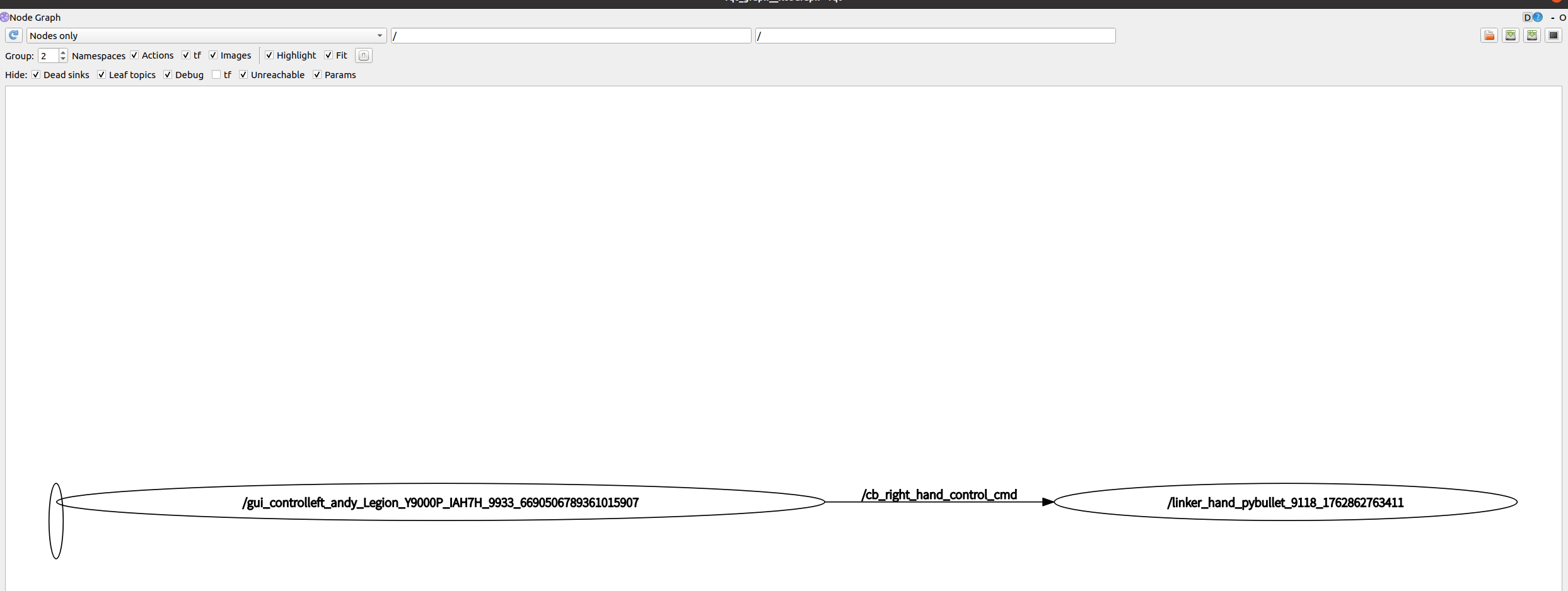
运行后,节点图如下:
rqt_graph
打印手的状态
rostopic echo /cb_right_hand_state_sim
显示如下
---
^Cheader:
  seq: 1342
  stamp:
    secs: 0
    nsecs:         0
  frame_id: ''
name:
  - joint71
  - joint72
  - joint73
  - joint77
  - joint75
  - joint76
  - joint77
  - joint78
  - joint79
  - joint80
  - joint81
  - joint82
  - joint83
  - joint84
  - joint88
  - joint86
  - joint87
  - joint88
  - joint89
  - joint90
position: [0.521, 0.0, 0.0, -0.0, -0.0, -0.0, -0.18, -0.18, -0.18, 0.0, -0.588, 0.0, 0.0, 0.0, 0.0, 0.179, 0.0, 0.0, 0.0, 0.0, 0.375, 0.0, -0.0, 0.0, 0.0]
velocity: [-0.07, 0.0, 0.0, 0.0, 0.0, 0.0, -0.0, -0.0, -0.0, 0.0, -0.002, 0.0, 0.0, 0.0, 0.0, -0.029, 0.0, 0.0, 0.0, 0.0, -0.043, 0.0, 0.0, -0.0, 0.0]
effort: [-0.017, 0.007, 0.005, 0.003, 0.007, -0.391, -0.069, -0.035, 0.002, 0.055, 0.001, 0.0, 0.0, 0.0, 0.0, -0.043, 0.0, 0.0, 0.0, 0.0, -0.082, 0.006, 0.002, 0.008, 0.006]
---
分析
该返回值是 ROS 标准的sensor_msgs/JointState消息,对应灵巧手的实时关节状态,核心信息如下:
-
基础信息:
-
第 1342 条消息(seq=1342),时间戳未设置(stamp 全为 0),无参考坐标系(frame_id 空)。
-
-
关节配置:
-
共 25 个关节(name 列表 25 项,含重复命名如 joint77、joint88,可能是输出误差),对应 L25 型号灵巧手(L25 定义 25 个关节)。
-
-
核心状态:位置(position):25 个关节的实际角度(单位推测为弧度),如 joint71 当前角度 0.521,部分关节角度为 0(静止)。
-
速度(velocity):多数关节速度接近 0(静止或低速),少数有微小速度(如 joint71 为 - 0.07 弧度 / 秒)。
-
受力(effort):多数关节受力 / 力矩较小(负载轻),仅 joint76 受力稍大(-0.391,单位推测为 N・m)。
-
整体来看,当前灵巧手多数关节处于静止或低速状态,负载较轻,符合仿真环境下的基础运动反馈特征。
打印控制指令
rostopic echo /cb_right_hand_control_cmd
显示如下
---
^Cheader:
  seq: 5858
  stamp:
    secs: 1762866038
    nsecs: 344485282
  frame_id: ''
name:
  - "\u5927\u62C7\u6307\u6839\u90E8"
  - "\u98DF\u6307\u6839\u90E8"
  - "\u4E2D\u6307\u6839\u90E8"
  - "\u65E0\u540D\u6307\u6839\u90E8"
  - "\u5C0F\u62C7\u6307\u6839\u90E8"
  - "\u5927\u62C7\u6307\u4FA7\u6446"
  - "\u98DF\u6307\u4FA7\u6446"
  - "\u4E2D\u6307\u4FA7\u6446"
  - "\u65E0\u540D\u6307\u4FA7\u6446"
  - "\u5C0F\u62C7\u6307\u4FA7\u6446"
  - "\u5927\u62C7\u6307\u6A2A\u6EDA"
  - "\u9884\u7559"
  - "\u9884\u7559"
  - "\u9884\u7559"
  - "\u9884\u7559"
  - "\u5927\u62C7\u6307\u4E2D\u90E8"
  - "\u9884\u7559"
  - "\u9884\u7559"
  - "\u9884\u7559"
  - "\u9884\u7559"
  - "\u5927\u62C7\u6307\u6307\u5C16"
  - "\u98DF\u6307\u6307\u5C16"
  - "\u4E2D\u6307\u6307\u5C16"
  - "\u65E0\u540D\u6307\u6307\u5C16"
  - "\u5C0F\u62C7\u6307\u6307\u5C16"
position: [255.0, 255.0, 255.0, 255.0, 255.0, 255.0, 255.0, 255.0, 255.0, 255.0, 255.0, 255.0, 255.0, 255.0, 255.0, 255.0, 255.0, 255.0, 255.0, 255.0, 255.0, 255.0, 255.0, 255.0, 255.0]
velocity: []
effort: []
---
分析
该消息为灵巧手的关节控制指令(sensor_msgs/JointState类型),核心信息如下:
-
关节型号:共 25 个关节,名称对应 L25 型号灵巧手(如 “大拇指根部”“食指指尖” 等,含预留关节)。
-
控制参数:
- 位置(position):所有关节目标位置均为 255.0(推测为该型号关节的最大行程或预设极限值);
- 速度(velocity) 和 受力(effort) 未设置(空数组),可能使用默认控制策略。
整体来看,这是一个让 L25 灵巧手所有关节运动到极限位置的控制指令,未指定运动速度和力参数。
gui_control.launch
<?xml version="1.0" encoding="utf-8"?>
<launch>
    <arg name="hand_type_left" default="right"/> <!-- left or right -->
    <arg name="hand_joint" default="L21"/>   <!--  O6\L6\L7\L10\L20\G20(工业版)\L21  -->
    <arg name="topic_hz" default="15"/>
    <arg name="is_arc" default="false"/> <!-- "false" or "true" -->
    <!-- 左手节点 -->
    <node pkg="gui_control" type="gui_control.py" name="gui_control$(anon left)" output="screen">
        <param name="hand_type" type="string" value="$(arg hand_type_left)"/>
        <param name="hand_joint" type="string" value="$(arg hand_joint)"/> <!--  O6\L6\L6P\L7\L10\L20\G20(工业版)\L21  -->
        <param name="topic_hz" type="int" value="$(arg topic_hz)"/>
        <param name="is_arc" type="bool" value="$(arg is_arc)"/>
    </node>


    <!-- 右手节点 -->
    <!-- <arg name="hand_type_right" default="right"/> -->
    <!-- <node pkg="gui_control" type="gui_control.py" name="gui_control$(anon right)" output="screen">
        <param name="hand_type" type="string" value="$(arg hand_type_right)"/>
        <param name="hand_joint" type="string" value="$(arg hand_joint)"/>
        <param name="topic_hz" type="int" value="$(arg topic_hz)"/>
        <param name="is_arc" type="bool" value="$(arg is_arc)"/>
    </node> -->
</launch>
图形化页面控制代码
import time,rospkg,rospy
import pybullet as p
import pybullet_data
from std_msgs.msg import String, Header
from sensor_msgs.msg import JointState
'''
rostopic pub /cb_right_hand_control_cmd sensor_msgs/JointState "{header: {seq: 0, stamp: {secs: 0, nsecs: 0}, frame_id: ''}, name: [], position: [248, 127, 107, 180, 214, 42, 137, 0.0, 30, 20, 189, 0.0, 0.0, 0.0, 0.0, 59, 47, 32, 11, 17, 170, 43, 84, 76, 81], velocity: [], effort: []}" -r 10
'''
class L21SimController:
    def __init__(self):
        self.left_hand_state_pub = rospy.Publisher("/cb_left_hand_state_sim",JointState,queue_size=10)
        self.right_hand_state_pub = rospy.Publisher("/cb_right_hand_state_sim",JointState,queue_size=10)
        rospack = rospkg.RosPack()
        urdf_path_left = rospack.get_path('linker_hand_pybullet_ros') + "/urdf/l21/left/linkerhand_l21_left.urdf"
        urdf_path_right = rospack.get_path('linker_hand_pybullet_ros') + "/urdf/l21/right/linkerhand_l21_right.urdf"
        urdf_path=urdf_path_right

        self.left_hand_num_joints = 17
        self.left_position = [0.0] * 17
        self.right_hand_num_joints = 17
        self.right_position = [0.0] * 17
        """
        初始化PyBullet仿真环境
        :param urdf_path: URDF文件路径
        :param start_pos: 初始位置 [x, y, z]
        :param start_ori: 初始姿态四元数 [x, y, z, w]
        """

        # 连接物理服务器
        self.client = p.connect(p.GUI)  # 使用图形界面
        p.setAdditionalSearchPath(pybullet_data.getDataPath())  # 添加默认资源路径
        # 初始化仿真参数
        p.setGravity(0, 0, -9.81)     # 设置重力
        p.setTimeStep(1./240.)        # 时间步长


        # 加载URDF模型
        try:
            self.left_hand_id = p.loadURDF(urdf_path_left, basePosition=[0, -0.1, 0.1], useFixedBase=True)
            self.right_hand_id = p.loadURDF(urdf_path_right, basePosition=[0, 0.1, 0.1], useFixedBase=True)
            #print(f"成功加载URDF模型: {urdf_path}")
        except Exception as e:
            print(f"加载URDF失败: {str(e)}")
            p.disconnect()
            raise
        p.setPhysicsEngineParameter(enableFileCaching=0)
        p.changeDynamics(self.right_hand_id, -1,
                linearDamping=0.99,
                angularDamping=0.99)
        # 设置摄像机视角
        self._setup_camera()
        self.print_all_joints(self.left_hand_id)

    def print_all_joints(self,hand_id):
        num_joints = p.getNumJoints(hand_id)
        print(f"Total joints: {num_joints}")

        for i in range(num_joints):
            joint_info = p.getJointInfo(hand_id, i)
            print(f"\nJoint Index: {i}")
            print(f"Joint Name: {joint_info[1].decode('utf-8')}")
            print(f"Joint Type: {joint_info[2]}")
            print(f"Joint Lower Limit: {joint_info[8]}")
            print(f"Joint Upper Limit: {joint_info[9]}")
            print(f"Joint Max Force: {joint_info[10]}")
            print(f"Joint Max Velocity: {joint_info[11]}")

    def _setup_camera(self, distance=1.5, yaw=45, pitch=-30, target_pos=[0, 0, 0]):
        """设置初始摄像机视角"""
        p.resetDebugVisualizerCamera(
            cameraDistance=distance,
            cameraYaw=yaw,
            cameraPitch=pitch,
            cameraTargetPosition=target_pos
        )

    def step_simulation(self):
        """执行单步仿真"""
        p.stepSimulation()
        time.sleep(1./240.)  # 保持实时仿真速度
    # 添加关节控制示例(在类中添加)
    def set_joint_control(self,hand_id, joint_index, target_velocity):
        """设置关节速度控制"""
        p.setJointMotorControl2(
            bodyUniqueId=hand_id,
            jointIndex=joint_index,
            controlMode=p.VELOCITY_CONTROL,
            targetVelocity=target_velocity
        )

    def set_joint(self,hand_id, pos):
        for index, item in enumerate(pos):
            p.setJointMotorControl2(
                bodyUniqueId=hand_id,           # 机器人ID
                jointIndex=index,          # 关节索引
                controlMode=p.POSITION_CONTROL,  # 控制模式:位置控制
                targetPosition=item,  # 目标位置
                force=500                        # 最大力矩限制
            )
    def set_left_position(self, pos):
        self.left_position = pos
    def set_right_position(self, pos):
        self.right_position = pos

    # 添加状态获取示例
    def get_joint_states(self):
        """获取所有关节状态"""
        return p.getJointStates(self.right_hand_id, range(p.getNumJoints(self.right_hand_id)))

    def run(self):
        """运行仿真循环"""
        print("开始仿真 (关闭窗口终止程序)...")
        mapping = {
            0: 6,  1: 1,   2: 21,
            3: 7,  4: 2,  5: 22,
            6: 8, 7: 3,   8: 23,
            9: 9,  10: 4, 11: 24,
            12: 10, 13: 5,
            14: 0,  15: 15, 16: 20
        }
        tmp_left = {
                "position":[0.0] * 25,
                "velocity":[0.0] * 25,
                "effort":[0.0] * 25
            }
        tmp_right = {
                "position":[0.0] * 25,
                "velocity":[0.0] * 25,
                "effort":[0.0] * 25
            }
        while True:
            self.step_simulation()
            for index in range(self.left_hand_num_joints):
                joint_state = p.getJointState(self.left_hand_id, index)
                # 检查当前关节是否在映射表中
                if index in mapping:
                    mapped_index = mapping[index]
                    tmp_left["position"][mapped_index] = round(joint_state[0],3)
                    tmp_left["velocity"][mapped_index] = round(joint_state[1], 3)
                    tmp_left["effort"][mapped_index] = round(joint_state[3], 3)
            for index in range(self.right_hand_num_joints):
                joint_state = p.getJointState(self.right_hand_id, index)
                # 检查当前关节是否在映射表中
                if index in mapping:
                    mapped_index = mapping[index]
                    tmp_right["position"][mapped_index] = round(joint_state[0],3)
                    tmp_right["velocity"][mapped_index] = round(joint_state[1], 3)
                    tmp_right["effort"][mapped_index] = round(joint_state[3], 3)
            left_msg = self.joint_msg(hand="left",position=tmp_left["position"], velocity=tmp_left["velocity"], effort=tmp_left["effort"])
            self.left_hand_state_pub.publish(left_msg)
            self.set_joint(self.left_hand_id,self.left_position)

            right_msg = self.joint_msg(hand="right",position=tmp_right["position"], velocity=tmp_right["velocity"], effort=tmp_right["effort"])
            self.right_hand_state_pub.publish(right_msg)
            self.set_joint(self.right_hand_id,self.right_position)
            # 处理键盘输入
            keys = p.getKeyboardEvents()
            if ord('q') in keys and keys[ord('q')] & p.KEY_WAS_TRIGGERED:
                break

    def joint_msg(self,hand,position,velocity,effort):
        # 初始化JointState消息
        joint_state_msg = JointState()
        if hand == "left":
            joint_state_msg.name = ["joint41","joint42","joint43","joint44","joint45","joint46","joint47","joint48",
"joint49","joint50","joint51","joint52","joint53","joint54","joint55","joint56","joint57","joint58","joint59","joint60"]  # 关节名称
        elif hand == "right":
            joint_state_msg.name = ["joint71","joint72","joint73","joint77","joint75","joint76","joint77","joint78","joint79","joint80","joint81","joint82","joint83","joint84","joint88","joint86","joint87","joint88","joint89","joint90"]  # 关节名称
        joint_state_msg.position = position  # 关节位置(弧度)
        joint_state_msg.velocity = velocity  # 关节速度
        joint_state_msg.effort = effort  # 关节力矩
        return joint_state_msg
    def __del__(self):
        """析构时断开连接"""
        p.disconnect()
参考官网代码
https://github.com/linker-bot/linkerhand-sim?tab=readme-ov-file

立足具身智能前沿赛道,致力于搭建全球化、开源化、全栈式技术交流与实践共创平台。
更多推荐
 31
31 0
0- 0


 已为社区贡献1条内容

所有评论(0)