ZooKeeper源码深度剖析:从单机启动到Leader选举的完整指南
本文详细介绍了ZooKeeper源码环境搭建与Leader选举机制的深度解析。主要内容包括:1)源码获取、编译问题解决及单机/集群启动配置;2)选举架构的核心类图分析,包括FastLeaderElection算法实现和消息传输层机制;3)选举流程源码追踪,涵盖选票数据结构、选举状态机和关键设计模式(观察者、策略、建造者模式);4)故障场景处理(脑裂防护、网络分区恢复)和性能监控方案;5)实用的调试
·
一、ZooKeeper源码环境搭建实战
1.1 源码获取与准备
# 官方源码仓库
git clone https://github.com/apache/zookeeper.git
cd zookeeper

# 推荐使用稳定版本
git checkout release-3.8.0
1.2 解决编译问题
源码导入IDEA后,常见问题及解决方案:
问题一:Version类编译错误
// org.apache.zookeeper.Version 需要辅助类
// 解决方案:创建Maven编译辅助类
public class VersionInfo {
    public static final String MAJOR = "3";
    public static final String MINOR = "8";
    public static final String MICRO = "0";
    public static final String QUALIFIER = "";
    public static final String REVISION = "";
    public static final String BUILD_DATE = "";
    public static final String BUILD_USER = "";
    public static final String BUILD_HOST = "";
}
问题二:Maven依赖scope处理
<!-- 修改pom.xml,注释provided scope依赖(除jline外) -->
<dependency>
    <groupId>org.apache.yetus</groupId>
    <artifactId>audience-annotations</artifactId>
    <!-- <scope>provided</scope> --> <!-- 注释此行 -->
</dependency>
1.3 单机模式启动配置
# 1. 复制配置文件
cp conf/zoo_sample.cfg conf/zoo.cfg

# 2. 配置日志文件
cp conf/log4j.properties target/classes/

# 3. 编译项目
mvn clean install -DskipTests

# 4. 设置启动参数
# 在IDEA中配置Program arguments:
# -Dzookeeper.log.dir=./logs -Dzookeeper.root.logger=INFO,CONSOLE conf/zoo.cfg
1.4 源码启动类分析
// 主入口类:QuorumPeerMain
public class QuorumPeerMain {
    public static void main(String[] args) {
        QuorumPeerMain main = new QuorumPeerMain();
        try {
            main.initializeAndRun(args);
        } catch (IllegalArgumentException e) {
            // 参数解析错误处理
        } catch (ConfigException e) {
            // 配置异常处理
        } catch (Exception e) {
            // 通用异常处理
        }
    }

    protected void initializeAndRun(String[] args) {
        QuorumPeerConfig config = new QuorumPeerConfig();
        if (args.length == 1) {
            // 单机模式
            config.parse(args[0]);
            runFromConfig(config);
        } else {
            // 集群模式
            // ...
        }
    }
}
二、ZooKeeper集群源码启动实战
2.1 三节点集群配置
properties
# 节点1配置:zoo1.cfg
tickTime=2000
dataDir=/tmp/zookeeper1/data
clientPort=2181
initLimit=5
syncLimit=2
server.1=localhost:2888:3888
server.2=localhost:2889:3889
server.3=localhost:2890:3890

# 节点2配置:zoo2.cfg(端口不同)
clientPort=2182
dataDir=/tmp/zookeeper2/data
# server配置相同

# 节点3配置:zoo3.cfg
clientPort=2183
dataDir=/tmp/zookeeper3/data
2.2 创建myid文件
# 每个节点的dataDir目录下创建myid文件
echo 1 > /tmp/zookeeper1/data/myid
echo 2 > /tmp/zookeeper2/data/myid
echo 3 > /tmp/zookeeper3/data/myid
2.3 集群启动脚本
// 集群启动辅助类
public class ClusterStarter {
    public static void main(String[] args) throws Exception {
        // 启动三个节点
        String[] configs = {
            "conf/zoo1.cfg",
            "conf/zoo2.cfg",
            "conf/zoo3.cfg"
        };

        ExecutorService executor = Executors.newFixedThreadPool(3);
        for (String config : configs) {
            executor.submit(() -> {
                try {
                    QuorumPeerMain.main(new String[]{config});
                } catch (Exception e) {
                    e.printStackTrace();
                }
            });
        }

        executor.shutdown();
        executor.awaitTermination(1, TimeUnit.HOURS);
    }
}
2.4 客户端连接测试
# 使用客户端连接源码启动的集群
./bin/zkCli.sh -server localhost:2181,localhost:2182,localhost:2183

# 或者从源码运行客户端
java -cp "target/classes:lib/*" org.apache.zookeeper.ZooKeeperMain \
    -server localhost:2181,localhost:2182,localhost:2183
三、Leader选举源码深度解析
3.1 选举架构概览
ZooKeeper的Leader选举采用多层队列架构,分为两个主要层次:
┌─────────────────────────────────────────────┐
│             选举应用层                      │
│  ┌─────────────────────────────────────┐    │
│  │        选票接收/发送队列             │    │
│  └─────────────────────────────────────┘    │
└─────────────────────────────────────────────┘
                     ↓
┌─────────────────────────────────────────────┐
│             消息传输层                      │
│  ┌──────┐  ┌──────┐  ┌──────┐              │
│  │机器1 │  │机器2 │  │机器3 │              │
│  │队列  │  │队列  │  │队列  │              │
│  └──────┘  └──────┘  └──────┘              │
└─────────────────────────────────────────────┘
3.2 核心类图分析
// 选举相关核心类
public interface Election {
    Vote lookForLeader() throws InterruptedException;
    void shutdown();
}

// FastLeaderElection - 默认选举算法
public class FastLeaderElection implements Election {
    private QuorumPeer self;
    private Messenger messenger;
    private volatile boolean shutdown = false;

    @Override
    public Vote lookForLeader() throws InterruptedException {
        // 1. 初始化投票
        // 2. 发送投票
        // 3. 接收投票并统计
        // 4. 判断是否选举成功
    }
}

// 消息传输层
class Messenger {
    private SendWorker sender;
    private RecvWorker receiver;
    private BlockingQueue<ToSend> sendQueue;
    private BlockingQueue<Notification> recvQueue;
}
3.3 选举流程源码追踪
3.3.1 选举初始化
public class FastLeaderElection {
    protected void starter(QuorumPeer self) {
        this.self = self;
        // 初始化发送队列
        sendqueue = new LinkedBlockingQueue<ToSend>();
        // 初始化接收队列
        recvqueue = new LinkedBlockingQueue<Notification>();

        // 创建消息发送器(每个对等体一个)
        for (QuorumVerifierAwareServer qv : self.getView().values()) {
            SendWorker sw = new SendWorker(qv);
            sw.start();
        }

        // 创建消息接收器
        RecvWorker rw = new RecvWorker(self, this);
        rw.start();
    }
}
3.3.2 选票数据结构
// 选票数据结构
public class Vote {
    private final long id;          // 被投票者的sid
    private final long zxid;        // 被投票者的事务ID
    private final long epoch;       // 选举周期
    private final ServerState state;// 投票时状态

    // 投票规则:先比较epoch,再比较zxid,最后比较sid
    public boolean isGreaterThan(Vote vote) {
        if (this.epoch > vote.epoch) return true;
        if (this.epoch < vote.epoch) return false;
        if (this.zxid > vote.zxid) return true;
        if (this.zxid < vote.zxid) return false;
        return this.id > vote.id;
    }
}

// 网络传输数据结构
class ToSend {
    long sid;           // 目标服务器ID
    byte[] message;     // 序列化的消息
    Notification n;     // 原始通知
}

class Notification {
    int version;        // 协议版本
    long sid;           // 发送者ID
    long peerEpoch;     // 选举周期
    long zxid;          // 最新事务ID
    ServerState state;  // 发送者状态
}
3.3.3 核心选举算法
public Vote lookForLeader() throws InterruptedException {
    try {
        // 阶段1:初始化投票(投给自己)
        self.setCurrentVote(new Vote(self.getId(),
                                    self.getLastLoggedZxid(),
                                    self.getCurrentEpoch(),
                                    self.getPeerState()));

        // 阶段2:发送初始化投票
        sendNotifications();

        // 阶段3:收集投票并统计
        while (!shutdown && self.getPeerState() == ServerState.LOOKING) {
            Notification n = recvqueue.poll(3000, TimeUnit.MILLISECONDS);

            if (n == null) {
                // 超时处理:重新连接
                manager.connectAll();
            } else if (validVoter(n.sid)) {
                // 处理接收到的投票
                switch (n.state) {
                    case LOOKING:
                        // 对方也在选举中
                        if (n.epoch > logicalclock.get()) {
                            // 更新逻辑时钟
                            logicalclock.set(n.epoch);
                            // 清空接收队列
                            recvset.clear();
                            // 更新自己的投票
                            updateVote(n);
                            // 发送更新后的投票
                            sendNotifications();
                        } else if (n.epoch == logicalclock.get()) {
                            // 同一选举周期
                            if (totalOrderPredicate(n.leader, n.zxid, n.sid,
                                                    proposedLeader, proposedZxid, proposedSid)) {
                                // 更新为更好的候选者
                                updateVote(n);
                                sendNotifications();
                            }
                        }
                        // 统计选票
                        recvset.put(n.sid, new Vote(n.leader, n.zxid, n.epoch, n.state));
                        // 检查是否获得多数票
                        if (termPredicate(recvset,
                                         new Vote(proposedLeader, proposedZxid,
                                                 logicalclock.get(), ServerState.LEADING))) {
                            // 选举成功,进入决策阶段
                            synchronized (this) {
                                if (proposedLeader == self.getId()) {
                                    // 自己成为Leader
                                    self.setPeerState(ServerState.LEADING);
                                } else {
                                    // 自己成为Follower
                                    self.setPeerState(ServerState.FOLLOWING);
                                }
                            }
                            end = true;
                        }
                        break;
                    case OBSERVING:
                        // 观察者不参与选举
                        break;
                    default:
                        // 已经确定了Leader
                        if (n.epoch == logicalclock.get()) {
                            recvset.put(n.sid, new Vote(n.leader, n.zxid, n.epoch, n.state));
                            // 检查是否已有Leader
                            if (ooePredicate(recvset, n)) {
                                self.setPeerState(ServerState.FOLLOWING);
                                end = true;
                            }
                        }
                        break;
                }
            }
        }
        return self.getCurrentVote();
    } finally {
        // 清理资源
        try {
            messenger.shutdown();
        } catch (Exception e) {
            LOG.warn("Failed to shutdown messenger", e);
        }
    }
}
3.4 消息传输层实现
3.4.1 发送工作器
class SendWorker extends Thread {
    private final QuorumPeer peer;
    private final BlockingQueue<ToSend> queue;
    private volatile boolean running = true;

    @Override
    public void run() {
        while (running && !shutdown) {
            ToSend toSend = null;
            try {
                // 从队列获取待发送消息
                toSend = queue.poll(3000, TimeUnit.MILLISECONDS);
                if (toSend != null && peer.isRunning()) {
                    // 序列化消息
                    ByteBuffer requestBuffer = buildMsg(toSend.message);
                    // 发送消息
                    peer.sendRequest(toSend.sid, requestBuffer);
                }
            } catch (InterruptedException e) {
                LOG.warn("Interrupted while waiting for message", e);
            } catch (Exception e) {
                LOG.warn("Failed to send message to sid: " + toSend.sid, e);
                // 连接失败,重新连接
                peer.reconnect(toSend.sid);
            }
        }
    }
}
3.4.2 接收工作器
class RecvWorker extends Thread {
    private final QuorumPeer peer;
    private final FastLeaderElection election;
    private volatile boolean running = true;

    @Override
    public void run() {
        while (running && !shutdown) {
            try {
                // 接收消息
                Message response = peer.readResponse();
                if (response != null) {
                    // 反序列化消息
                    Notification n = parseNotification(response);
                    if (validNotification(n)) {
                        // 放入接收队列
                        election.recvqueue.offer(n);
                    }
                }
            } catch (InterruptedException e) {
                LOG.warn("Interrupted while reading response", e);
            } catch (Exception e) {
                LOG.warn("Failed to receive message", e);
            }
        }
    }
}
3.5 选举状态机
public enum ServerState {
    LOOKING,    // 寻找Leader状态
    FOLLOWING,  // 跟随者状态
    LEADING,    // 领导者状态
    OBSERVING   // 观察者状态
}

// 状态转换处理
public class QuorumPeer {
    public void setPeerState(ServerState newState) {
        ServerState oldState = this.state;
        this.state = newState;

        if (newState == ServerState.LEADING) {
            // 成为Leader的初始化工作
            leader = new Leader(this, zkDb);
            leader.start();
        } else if (newState == ServerState.FOLLOWING) {
            // 成为Follower的初始化工作
            follower = new Follower(this, zkDb);
            follower.start();
        }

        LOG.info("Peer state changed: {} -> {}", oldState, newState);
    }
}
四、Leader选举的关键设计模式
4.1 观察者模式的应用
// 选举事件观察者
public interface ElectionListener {
    void onElectionStart();
    void onVoteReceived(Vote vote);
    void onElectionComplete(ServerState state, long leaderId);
}

// 具体观察者实现
public class ElectionMonitor implements ElectionListener {
    @Override
    public void onElectionStart() {
        LOG.info("Election started at {}", System.currentTimeMillis());
    }

    @Override
    public void onVoteReceived(Vote vote) {
        LOG.debug("Received vote for sid: {}", vote.getId());
    }

    @Override
    public void onElectionComplete(ServerState state, long leaderId) {
        LOG.info("Election complete. New state: {}, Leader: {}", state, leaderId);
    }
}
4.2 策略模式:选举算法可插拔
// 选举策略接口
public interface ElectionStrategy {
    Vote elect(Set<QuorumPeer> peers) throws ElectionException;
}

// 快速选举策略(默认)
public class FastElectionStrategy implements ElectionStrategy {
    @Override
    public Vote elect(Set<QuorumPeer> peers) {
        // 实现快速选举算法
        return new Vote(selectLeader(peers),
                       getMaxZxid(peers),
                       getCurrentEpoch(),
                       ServerState.LEADING);
    }
}

// 认证选举策略
public class AuthElectionStrategy implements ElectionStrategy {
    @Override
    public Vote elect(Set<QuorumPeer> peers) {
        // 实现带认证的选举算法
        return authenticatedElection(peers);
    }
}
4.3 建造者模式:选举配置
public class ElectionConfigBuilder {
    private int timeout = 5000;
    private ElectionStrategy strategy = new FastElectionStrategy();
    private List<ElectionListener> listeners = new ArrayList<>();

    public ElectionConfigBuilder withTimeout(int timeout) {
        this.timeout = timeout;
        return this;
    }

    public ElectionConfigBuilder withStrategy(ElectionStrategy strategy) {
        this.strategy = strategy;
        return this;
    }

    public ElectionConfigBuilder addListener(ElectionListener listener) {
        this.listeners.add(listener);
        return this;
    }

    public ElectionConfig build() {
        return new ElectionConfig(timeout, strategy, listeners);
    }
}
五、故障场景源码分析
5.1 脑裂问题处理
public class FastLeaderElection {
    // 防止脑裂的机制:要求多数票
    private boolean hasAllQuorums(Map<Long, Vote> votes, Vote leaderVote) {
        int count = 0;
        for (Vote v : votes.values()) {
            if (v.equals(leaderVote)) {
                count++;
            }
        }
        // 必须获得半数以上投票
        return count > (self.getQuorumVerifier().getVotingMembers().size() / 2);
    }
}
5.2 网络分区恢复
public class QuorumPeer {
    // 网络分区恢复后的处理
    protected void reconnectAfterPartition() {
        synchronized (connectionManager) {
            // 1. 检查连接状态
            for (QuorumServer server : getView().values()) {
                if (!isConnected(server.id)) {
                    // 2. 重新建立连接
                    connectOne(server.id, server.addr);
                }
            }
            // 3. 重新发起选举
            if (needNewElection()) {
                startNewElection();
            }
        }
    }
}
5.3 Leader故障检测
public class Follower {
    private volatile long lastHeartbeatTime = System.currentTimeMillis();

    // 心跳检测线程
    private class HeartbeatChecker extends Thread {
        @Override
        public void run() {
            while (running) {
                long current = System.currentTimeMillis();
                if (current - lastHeartbeatTime > heartbeatTimeout) {
                    // Leader可能故障,发起新选举
                    LOG.warn("Leader heartbeat timeout, starting new election");
                    startNewElection();
                    break;
                }
                Thread.sleep(heartbeatCheckInterval);
            }
        }
    }
}
六、性能优化与监控
6.1 选举性能监控
public class ElectionMetrics {
    private final Counter electionCounter = Metrics.counter("zookeeper.election.count");
    private final Timer electionTimer = Metrics.timer("zookeeper.election.duration");
    private final Gauge electionParticipants = Metrics.gauge("zookeeper.election.participants",
                                                             () -> getCurrentParticipants());

    public void recordElection(long duration, boolean success) {
        electionCounter.increment();
        electionTimer.record(duration, TimeUnit.MILLISECONDS);

        if (!success) {
            Metrics.counter("zookeeper.election.failures").increment();
        }
    }
}
6.2 队列监控
public class QueueMonitor {
    // 监控选举队列状态
    public void monitorElectionQueues() {
        ScheduledExecutorService scheduler = Executors.newSingleThreadScheduledExecutor();
        scheduler.scheduleAtFixedRate(() -> {
            // 监控发送队列大小
            int sendQueueSize = fastLeaderElection.getSendQueueSize();
            Metrics.gauge("zookeeper.election.send.queue.size", sendQueueSize);

            // 监控接收队列大小
            int recvQueueSize = fastLeaderElection.getRecvQueueSize();
            Metrics.gauge("zookeeper.election.recv.queue.size", recvQueueSize);

            // 监控队列处理延迟
            long processingDelay = calculateProcessingDelay();
            Metrics.timer("zookeeper.election.queue.processing.delay").record(processingDelay, TimeUnit.MILLISECONDS);
        }, 0, 5, TimeUnit.SECONDS);
    }
}
七、调试技巧与实战
7.1 调试断点设置
// 关键调试断点位置
1. FastLeaderElection.lookForLeader() - 选举主流程
2. QuorumPeer.setPeerState() - 状态转换点
3. Messenger.SendWorker.run() - 消息发送点
4. Messenger.RecvWorker.run() - 消息接收点
5. QuorumCnxManager.connectOne() - 连接建立点
7.2 选举过程日志分析
# 启用详细选举日志
-Dzookeeper.election.verbose=true
-Dzookeeper.tracelog.dir=./election-traces

# 日志输出示例
[INFO] Election started: epoch=15, zxid=0x100000001
[DEBUG] Sending vote to sid=2: Vote{sid=1, zxid=0x100000001, epoch=15}
[DEBUG] Received vote from sid=2: Vote{sid=2, zxid=0x100000001, epoch=15}
[INFO] Election result: leader=1, state=LEADING
7.3 常见问题调试
// 选举卡住问题诊断
public class ElectionDebugger {
    public void diagnoseStuckElection() {
        // 1. 检查网络连接
        for (QuorumServer server : getView().values()) {
            boolean connected = testConnection(server.addr);
            LOG.info("Server {} connection status: {}", server.id, connected);
        }

        // 2. 检查队列状态
        LOG.info("Send queue size: {}", sendqueue.size());
        LOG.info("Receive queue size: {}", recvqueue.size());

        // 3. 检查选举超时
        long electionStartTime = getElectionStartTime();
        long currentTime = System.currentTimeMillis();
        if (currentTime - electionStartTime > MAX_ELECTION_TIMEOUT) {
            LOG.warn("Election timeout exceeded, restarting election");
            restartElection();
        }
    }
}
总结与最佳实践
核心收获
-
源码阅读方法论:从使用到主线,再到细节,最后整合
-
环境搭建技巧:解决编译问题,配置集群环境
-
选举算法精髓:理解快速选举算法的多层队列架构
-
设计模式应用:观察者、策略、建造者等模式在实际框架中的应用
-
故障处理机制:脑裂防护、网络分区恢复等关键机制
生产环境建议
-
选举超时配置:根据网络状况合理设置选举超时时间
-
队列监控:实时监控选举队列状态,预防消息堆积
-
日志级别:生产环境适当降低选举日志级别,避免日志爆炸
-
网络优化:确保选举节点间的网络延迟和带宽满足要求
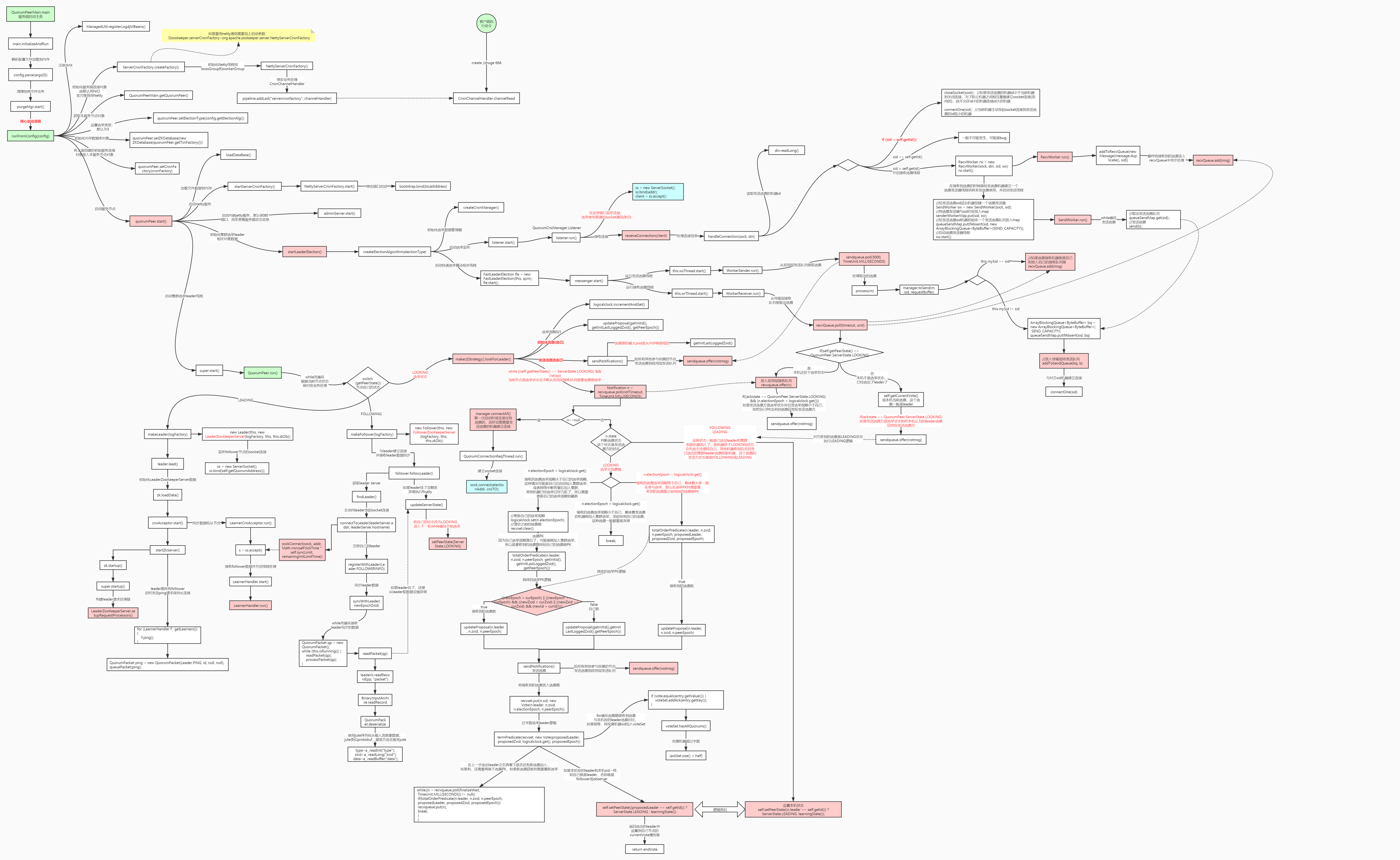
Leader选举源码剖析:

立足具身智能前沿赛道,致力于搭建全球化、开源化、全栈式技术交流与实践共创平台。
更多推荐
 8
8 0
0- 0


 已为社区贡献8条内容

所有评论(0)